Connect Shopify to Amazon: Complete 2026 guide
Table of Contents
In 2026, connecting Shopify to Amazon is no longer optional for ambitious sellers, it’s essential for sustainable growth. With AI-powered inventory management, and syncing your products, inventory, and orders. This setup lets you sell on Amazon while also building a DTC channel on Shopify, where you own your customer data and margins.
Why sell on Shopify and Amazon in 2026
Hundreds of millions of Americans regularly shop on Amazon, and nearly half of all online spending nationwide flows through its platform.
Amazon captures about 40 cents of every dollar spent online in America. Plus, millions of sellers rely on Amazon’s U.S. marketplace to reach customers. For sellers, Amazon represents immediate access to massive demand, but at a cost.
The landscape has shifted dramatically since 2025. According to industry data, approximately 80% of Amazon third-party sellers now operate on multiple ecommerce platforms. This isn’t optional anymore, it’s a survival strategy.
Sellers who rely solely on Amazon face three critical risks:
1.Fee Pressure – Amazon’s fees have increased, and new fee categories continue to emerge
2.Algorithm Dependency – Visibility depends entirely on Amazon’s search algorithm and advertising spend
3.Account Vulnerability – A single account suspension can eliminate 100% of marketplace reve
Can Shopify integrate with Amazon in 2026?
Yes, and it’s better than ever. In 2026, integration is seamless, reliable, and increasingly automated. The connection works in both directions: you can publish Shopify products to Amazon and pull Amazon orders back into Shopify for unified order management.
How Integration Works
The typical flow is:
1.You create products in Shopify with all details (title, description, images, variants, pricing)
2.An integration app syncs these products to Amazon Seller Central
3.Inventory updates flow in real-time between platforms
4.Orders from both channels appear in a unified dashboard
5.Fulfillment can be handled from either platform depending on your strategy
Integration tools comparison (2026)
Native solutions
Shopify Marketplace Connect (Official Shopify App)
•Best for: Sellers who want simplicity and native integration
•Key Features: Publish Shopify products to Amazon, sync inventory & prices, import Amazon orders into Shopify, manage multiple marketplaces (Amazon, Walmart, eBay, Target Plus)
•Strengths: Built into Shopify, minimal setup, reliable support
•Limitations: Limited advanced rules, fewer bulk editing options
•Cost: Free to $99/month depending on features
•2026 Update: Now includes AI-powered product optimization suggestions
Amazon MCF & Buy with Prime (Amazon Official App)
•Best for: Sellers already using FBA who want Prime trust on their DTC store
•Key Features:
- MCF (Multi-Channel Fulfillment): Fulfill Shopify orders from your FBA inventory
- Buy with Prime: Add Prime checkout option on Shopify product pages
- Integrated returns management
•Strengths: Leverages existing FBA inventory, Prime branding increases conversion
•Limitations: Requires FBA inventory, limited to Amazon fulfillment
•Cost: No additional fee beyond FBA costs
•2026 Update: Buy with Prime now supports same day delivery in major metros
Specialized Platforms
Printify (Print-on-Demand + Multichannel)
•Best for: Sellers with print-on-demand or custom products who want Amazon integration
•Key Features: Automatic order fulfillment, inventory sync, multi-marketplace support
•Limitations: Quality varies by partner, longer delivery times (up to 14 days)
•Strengths: Handles fulfillment automatically, no inventory management needed
•Cost: Per-order fees (varies by product type)
•2026 Update: Now supports direct Amazon integration
Syncio (Multichannel Management Platform)
•Best for: Sellers managing 3+ sales channels
•Key Features: Centralized inventory, order management, pricing rules, bulk editing
•Strengths: Powerful automation, advanced rules engine, excellent support
•Cost: $99-499/month depending on volume
•2026 Update: Added AI-powered pricing optimization
Akeneo (Product Information Management)
•Best for: Enterprise sellers with complex catalogs (1000+ SKUs)
•Key Features: Centralized product data, multi-language support, enrichment workflows
•Strengths: Industry-leading PIM, handles massive catalogs
•Cost: Custom pricing (typically $500+/month)
•Best for: Sellers with large or complex catalogs needing advanced rules
•Key Features: Advanced listing rules, bulk editing, multiple marketplace support
•Strengths: Powerful automation, good for complex scenarios
•Limitations: Steeper learning curve, more expensive
•Cost: $99-299/month
•Best for: Multi-channel sellers (Amazon, eBay, Walmart, TikTok Shop)
•Key Features: Central dashboard, product listing management, cross-channel sync
•Strengths: Handles multiple channels well, good support
•Cost: $99-199/month
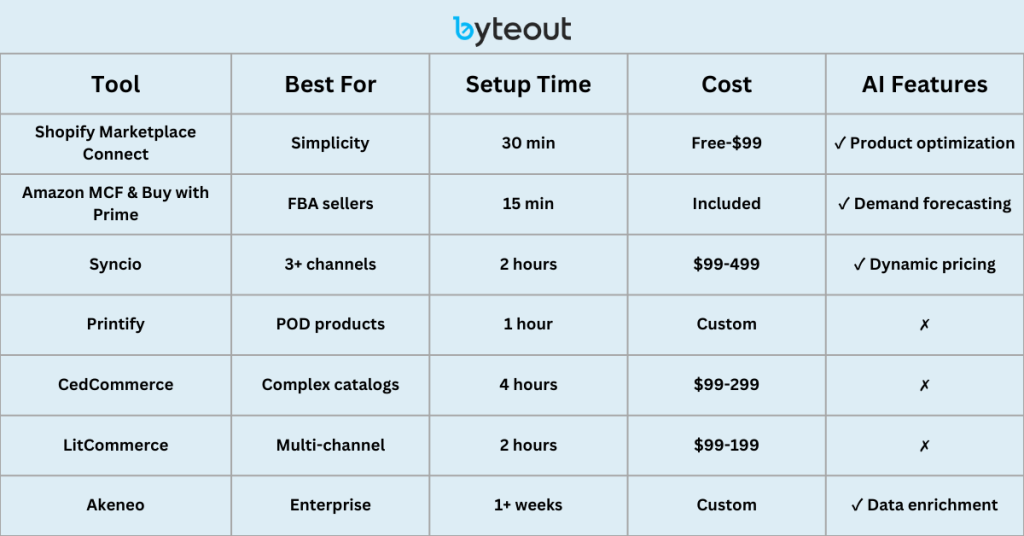
Quick Chooser: What to use when
For merchants whose primary goal is simply to list their existing Shopify catalog on Amazon and keep inventory in sync, the most efficient starting point is Shopify Marketplace Connect. It is Shopify’s native integration, designed to manage listings, stock levels, and orders between Shopify and Amazon with minimal configuration.
And for sellers already leveraging Fulfilled by Amazon (FBA), the best path is to extend that infrastructure into Shopify using the Amazon Multi-Channel Fulfillment (MCF) and Buy with Prime app.
For sellers with more custom needs, such as advanced listing rules, AI-powered optimization, or multi-marketplace operations, solutions like Syncio or Akeneo provide additional flexibility and control.
Benefits of linking Shopify and Amazon
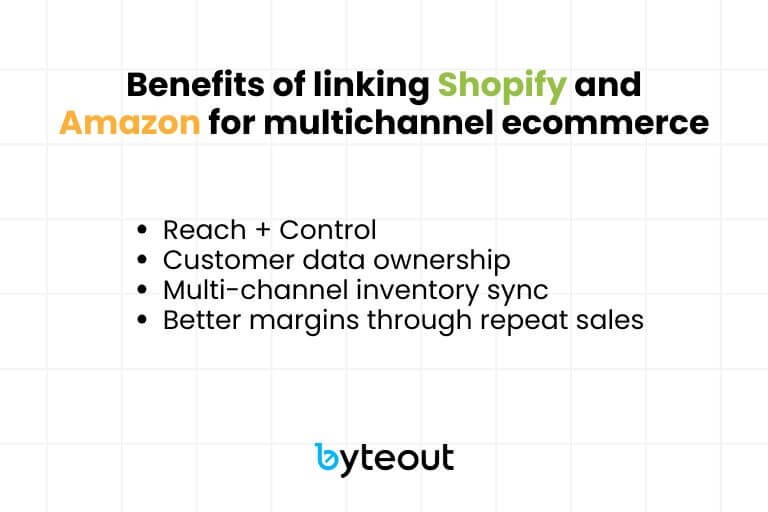
Amazon is a powerful sales platform, but long-term brand growth requires more than just a marketplace presence. If sellers connect Shopify to Amazon, they can take advantage of Amazon’s reach while building a DTC channel that they fully own.
Reach + Control
Amazon brings scale. Shopify brings ownership. Linking the two lets you sell to millions of Amazon shoppers without giving up control of your brand experience. On Shopify, you decide how products are presented, how customers interact with your store, and what story your brand tells.
When evaluating your multi-channel strategy, it’s important to understand the fundamental difference between selling through Amazon’s ecosystem and building a standalone brand, something that goes far beyond fulfillment logistics. A detailed comparison of Amazon FBA vs Shopify: Which one builds a real brand? breaks down how each model impacts brand equity, customer ownership, and long-term growth potential.
Customer data ownership
On Amazon, customer relationships stop at the transaction. On Shopify, you gain access to customer emails, repeat purchase behaviour, and lifetime value metrics.
This data enables:
- Targeted email campaigns
- Loyalty programs
- Subscription offerings
- Personalized recommendations
Multi-channel inventory sync
Stock updates instantly reflect across both platforms.
This prevents:
- Overselling (selling the same unit twice)
- Out-of-stock errors
- Manual reconciliation work
- Customer frustration from cancellations
Better margins through repeat sales
Every Amazon order comes with referral fees and ad costs. A repeat customer on Shopify costs a fraction of that to win back. Once you’ve attracted buyers on Amazon, you can encourage them to buy again directly through your Shopify store, improving profit margins over time.
Compared to Amazon’s referral fees (usually 8-15% depending on category), Shopify’s transaction fees are much lower, especially when paired with Shopify Payments. That margin difference matters as you scale.
Why a DTC store matters for brand growth
This is critical for all ambitious sellers to understand: having a DTC store isn’t optional if you want to grow beyond Amazon. Shopify becomes your brand’s headquarters and the channel where you set pricing, own customer relationships, and build long-term loyalty. Without it, you’re always renting customers from Amazon. With it, you’re building a brand that can scale independently of marketplace algorithms and fees.
However, many Amazon sellers underestimate the transition. Moving from a marketplace-driven model to a DTC strategy requires different systems, marketing skills, and conversion optimization. In fact, many brands struggle during this shift, which is explained in detail in Why Amazon sellers fail when moving to Shopify. Understanding these common mistakes helps you avoid them and build your Shopify store the right way from day one.
Step-by-Step: How to connect Shopify to Amazon via Seller Central in 2026
Step #1 Compliance check
What you do:
- Open/upgrade to an Amazon Professional Selling Plan ($39.99/month, required for integrations)
- Check if your products need category or brand approval.
- Ensure every product has a valid product ID (UPC/EAN/ISBN) or request a GTIN exemption if you don’t.
- Confirm images follow Amazon’s image requirements (pure white background, min. 1600px).
- Review your seller performance dashboard metrics
Without this foundation, your listings can be blocked, suppressed, or rejected. Account suspension can happen if you violate policies. Amazon now has stricter enforcement of data accuracy. Incomplete or inaccurate product data can result in automatic suppression.
Step #2 Choose your integration tool
Decide which option is the best one for your case. If you need any help, feel free to book a free consultation with us. The choice impacts your workflow, error handling, and scalability.
Just starting? → Shopify Marketplace
ConnectUsing FBA? → Amazon MCF & Buy with Prime
Multiple channels? → Syncio
A large catalog? → Akeneo
Step #3 Prepare Shopify product data
Amazon relies on IDs + strict data formats for catalogue integrity, so this step needs your additional attention.
- Ensure unique SKUs across catalog.
- Enter Barcode/GTINs in Shopify.
- Apply for a GTIN exemption if needed.
- Verify brand/category approvals.
- Upload compliant images using Amazon’s standards.Write clear, keyword-rich product titles
- Create detailed bullet points (5 required)
- Write compelling product descriptions
- Set correct product categories
Step #4 Map products to Amazon
Wrong mapping leads to duplicates, lost reviews, suppressed listings. You don’t want that. So:
- If a product exists on Amazon, match it to the correct ASIN.
- If new, create a new ASIN with full attributes.
- Set up parent–child variations (sizes, colors) properly.
Step #5 Configure inventory sync and shipping&returns
- Enable real-time sync between Shopify and Amazon.
- Choose fulfillment:
- FBM (Fulfilled by Merchant) → you handle shipping.
- FBA (Fulfilled by Amazon) → Amazon holds and ships your inventory.
- Optionally enable MCF (Multi-Channel Fulfillment) so FBA stock can also fulfill Shopify orders.
- For FBM, set up shipping templates in Seller Central.
- For FBA/MCF, use Send to Amazon workflow to send inventory in; Amazon then controls delivery promises and returns.
Step #6 Test the integration
Testing small avoids big catalog errors so don’t skip this step so you make sure everything is well connected.
We’d recommend to:
- Sync only 5–10 SKUs.
- Place a test Amazon order and check:
- Order flows into Shopify.
- Inventory decrements.
- Tracking updates sync back.
- Test a return/refund process
- Verify pricing is correct on both platforms
Step #7 Go live & monitor
If everything works, you can:
- Push your full catalog
- For the first week, monitor daily:
- Listing errors (attributes/images)
- Suppressed listings (category/brand)
- Price warnings
- Account health signals in the Performance Dashboard
- Set up alerts for inventory discrepancies
- Monitor customer reviews and feedback
Before you begin the integration process, it’s crucial to follow a comprehensive setup plan that ensures nothing gets missed. For a full preparation roadmap, see From Amazon to Shopify Check list, a detailed checklist that covers the essential steps to transition your products and account data smoothly.
Amazon to Shopify product import guide

When you’ve been selling on Amazon for a while, it’s easy to forget that all your hard work (optimizing titles, uploading images, managing variations) lives inside Amazon’s ecosystem.
It works there, but it doesn’t automatically give you a foundation for building your own DTC Shopify store. That’s why many Amazon sellers who decide to launch a Shopify shop face the same question: should I start fresh, or can I pull my existing Amazon listings into Shopify?
There are good reasons to import. If your catalog is already polished on Amazon, bringing that data into Shopify saves hours of re-entry. It also ensures consistency over the SKUs, titles, and description. How you bring products over depends on your situation. If you only have a small handful of products, you can export your listings from Amazon as a flat file and then reshape that file into Shopify’s CSV format.
For larger catalogs, most sellers don’t want to wrestle with spreadsheets. Tools like Shopify Marketplace Connect can connect directly to your Amazon Seller Central, pull product data, and publish those items into Shopify.
All serious sellers need to understand that importing products is never “plug and play.” Amazon’s data doesn’t map one-to-one with Shopify’s. For product images, Amazon stores them differently, and sometimes the links don’t carry over, so you’ll open your new Shopify site only to see empty boxes where photos should be.
Descriptions also often come in incomplete. The bullet points you carefully wrote in Amazon may not import at all, or the HTML formatting might break. Variations are another sore point. Amazon structures them as parent/child ASINs, while Shopify uses “options” and “variants.” If you don’t map them carefully, you’ll end up with fragmented products in your Shopify store.
So the takeaway is this: importing your Amazon catalog into Shopify is a smart move when you want speed, consistency, and a head start on building your DTC channel. But whichever method you choose: CSV for small sellers, integration apps for mid-sized catalogs, or migration services for the big players, plan for a round of cleanup afterward. Your Shopify store is your brand’s home. It deserves more than just a copy-paste job.
Scaling beyond the connection
Connecting Amazon to Shopify is only the first step. That integration ensures your products, inventory, and orders move between platforms. But to actually grow as a DTC brand, a Shopify store requires a bit more. To build a channel you fully own, your store should have:
- Good and clean design – A storefront that reflects your brand identity and builds trust
- High-converting product pages – Optimized layouts with clear messaging, comparison details, and strong CTAs
- Retention tools – Email marketing flows, loyalty programs, and subscription options to keep customers coming back.
For some sellers, the leap from a basic connected store to a fully optimized, high-performance Shopify brand requires outside help. If you’re wondering whether you might need professional assistance, check out Top 5 signs it’s time for Shopify migration services, a checklist that highlights when migration support makes sense for your business growth.
How we support Amazon sellers
Our role is to help Amazon sellers turn marketplace success into long-term brand growth and build Shopify stores for Amazon sellers.
Planning & strategy.
We review your Amazon catalog and sales data, then define how your brand translates to Shopify. This includes deciding which products to lead with and how to position them in a DTC environment.
Technical setup.
We handle the full Shopify build, connect it to Amazon through approved integrations, and ensure inventory, fulfillment, and order flows work reliably
Store design.
We design a professional Shopify storefront and optimize product pages for conversion.
Marketing strategy.
Launching a Shopify store needs a lot of work but it’s only the beginning – and we leave no sellers behind. You can get a full marketing strategy made by people who know how to make a profitable online selling business.
Launch.
After launch, we’re still there to make sure everything works great.
If you’re an Amazon seller ready to grow beyond the marketplace, we can help you build a Shopify store that not only connects but converts and retains customers.
Book a free consultation and see how your Amazon success can become a direct-to-consumer brand.
FAQs
-
How to link Shopify to Amazon?
Amazon Sellers can connect Shopify to Amazon using Shopify Marketplace Connect or approved third-party apps, which sync your products, inventory, and orders between both platforms.
-
Can Shopify integrate with Amazon without an app?
No, you need an integration app such as Marketplace Connect or a third-party solution.
-
What’s the best Shopify to Amazon integration app or plugin?
For most Amazon sellers, Shopify Marketplace Connect is the best choice because it’s native and simple, but some sellers may prefer other apps depending on their needs.
-
Do I need an Amazon Professional Seller account to connect Shopify?
Yes. You need an active Professional Seller account on Amazon Seller Central to use Shopify Marketplace Connect or any other integration plugin. The Individual plan doesn’t allow these connections.
-
Can I import Amazon products into Shopify?
Yes, but it isn’t plug-and-play. You can use CSV exports, integration apps, or migration tools, but expect to adjust images, descriptions, and variants after import.
-
If you connect Shopify to Amazon, does it help SEO?
Not directly. SEO performance depends on how your Shopify store is structured, optimized, and maintained over time. Technical setup, content architecture, and keyword targeting all play a significant role, which is why many brands eventually start asking Does a Shopify SEO expert have superpowers? when trying to unlock sustainable organic growth. A DTC site improves long-term brand visibility, but only when it’s built with search performance in mind.
-
Can someone else connect Shopify to Amazon for you?
Absolutely, agencies like ours specialize in building Shopify stores for Amazon sellers, handling integration, store design, and optimization so you can focus on growth.
-
What if my Amazon account gets suspended?
Your Shopify store continues operating independently. This is why DTC is so important, it protects your business.
Conclusion
In 2026, connecting Shopify to Amazon is a strategic necessity, not an option. The combination of Amazon’s reach and Shopify’s ownership creates a powerful, resilient business model. With AI-powered automation, unified analytics, and proper compliance, you can scale profitably across channels while building a brand that’s independent of any single platform.
The key is to start simple (Shopify Marketplace Connect or MCF), master the basics, then gradually add complexity (AI tools, additional channels, advanced analytics) as your business grows.
Your next steps:
1.Audit your current setup against the compliance checklist
2.Choose your integration tool
3.Test with 5-10 products
4.Scale gradually while monitoring metrics
The sellers who thrive in 2026 aren’t the ones with the biggest inventory, they’re the ones with the best systems, data and automation. Start building yours today.
We’ve helped many sellers turn their marketplace presence into full-blown brands.
Let’s do the same for you, get in touch today!

Your Amazon store needs a partner
We build and grow your Shopify DTC business together with Amazon.
Find out how to own your audience and not depend only on Amazon high fees.

Author: Dusan Popovic

From Amazon to Shopify Check list

Best Amazon FBA course 2026
Connect Shopify to Amazon: Complete 2026 guide